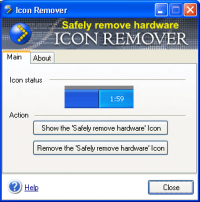
Icon Remover is a freeware system utility designed for removing the annoying Safely Remove Hardware icon. Command line support. Simple user interface.
Some new USB devices such as ADSL cable modems, SATA HDD drives, ZIP Drives, External CDROMs are hotplug devices. A hotplug device means that you can
remove the device any time without switching off the computer. If you want to remove the device, click the "Safely Remove Hardware" icon in the system
tray (a small green arrow near the clock). It's possible that you never unplug this device. So how do you get rid of the icon?
Try Icon Remover! Just click the "Remove the Safely Remove Hardware Icon" button. That's all! Now you can restart or turn off your computer easily, the
annoying icon will not appear anymore. If you want to get the icon back, just click the "Show the Safely Remove Hardware Icon" button.
Important note: unlike other such programs, Icon Remover removes the icon automatically even after you restart or turn off the computer.
Icon Remover offers you the following features:
- Removing the "Safely Remove Hardware" icon completely
- Getting the icon back at any moment
- Command line support - "/removeicon" and "/showicon" commands Whats new in version 1.4: 1. Request New Feature...link added to the About page. 2. Uninstall Feedback page added. Requirements: 1MB RAM, 1.3 MB HDD, USB support Operating system: WinXP,Windows2000 Limitations: Nag-Screen Release notes: Major Update
This tool scans all local hard disks for icons of various file formats and extracts them from files to a more user-friendly visual image list. This also stores found icons in a database and compresses them.
Price: $29.95, Rating: 5, Downloads: 109 Download
The Easiest Way to Make Your Computer Folders Beautiful. Easily change your computer folders beautifully simply by drag&drop. Enjoy many cool, exciting and fun looking folders. Quickly identify folders importance based on different colors.
Price: $29.97, Rating: 8, Downloads: 107 Download
Allows to change icons of the chosen folder to any chosen by you. And even at connection of a hard disk to other computer of an icon will remain such what they were made by you.
Price: $9.99, Rating: 10, Downloads: 80 Download

 Icon Remover 1.4 details